Sunday, April 12, 2015

Chapter 6

Chapter 6 discusses "Fostering Online Learning w/ Educational Websites & Apps." The chapter starts off with a student teacher discovering the internet. I found this particular section very useful because it gave information on how the internet can be a key to your success as a teacher. There are plenty of web based programs that assist with teaching students.


Information management is another important subject in Chapter 6. Information  management is used to describe how organizations and systems keep track of data for making decisions and setting policies. With teaching, it used to provide digital resources to help a student's learning. Information management is important because with teaching, you need to be able to share information with the student and vice-versa. Digital resources are an easier way to keep information up to date. Some textbooks were printed years ago and the information can end up being inaccurate. It's a lot easier to use digital resources because you can easily change the information to make it correct.
Bookmarking and Cloud computing for teachers was another important section. Bookmarking helps you better locate a website that you use often. It electronically marks different pages and saves them with just one simple command. Cloud computing is slowly taking book marking's place. Now, we have something called "the cloud", which is stored on the web for the teacher to access his/her material, anywhere.

RESOURCES:
 Bitstrips for Schools. N.p., n.d. Web. 12 Apr. 2015.

"Internet Guide : How to Bookmark a Web Page." YouTube. YouTube, n.d. Web. 12 Apr. 2015. 

 Maloy, Robert, Verock-O’Loughlin,Ruth-Ellen, Edwards, Sharon A., and Woolf, Beverly Park (2013). Transforming Learning with New Technologies. 2nd Edition. Boston, MA: Pearson Education, Inc.

 "QM 2014 Conference: Challenges of Digital Accessibility." YouTube. YouTube, n.d. Web. 12 Apr. 2015.

"What Is Cloud Computing?" PCMAG. N.p., n.d. Web. 12 Apr. 2015. 
 

Sunday, April 5, 2015

Chapter 11


Chapter 11 discusses engaging students in performance assessment and reflective learning. The chapter starts off with a new teacher insisting on having the students do portfolios instead of unit tests. I believe this is a good idea. It allows the students to use technology and become ore hands on than a traditional, multiple choice test every few weeks. Portfolio assessments are an alternative that I might actually consider using in my class room.

Chapter 11 also discusses the role of assessment in teaching and learning. It provided me with insight on how and what teachers and students are critiqued on. Before you officially become a teacher, you will be evaluated and judged on the way you deliver the material and your overall classroom performance. Student assessment is when the teacher evaluates the student. Gather information on where they stand academically in your classroom. Student self-assessment is a way for students to critique themselves. If the student can identify and correct their own errors, it makes the teacher's job a bit simpler. I feel like this really comes in handy for the student and the teacher. It helps both of them to be consistent and more focused on the task at hand.

Reflection is another effective way of assessment. By keeping a portfolio, the student can reflect on things they have done in the past and be able to identify mistakes and growth to where they are academically now. It's always effective with teachers as well. They too can see the growth of themselves as educators and how they have changed professionally. A portfolio helps you become a master educator and helps you identify teaching practices and your own strengths and weaknesses.
RESOURCES:
 "2:2 - Why Use Portfolio Assessment?" Portfolio Asessment. N.p., n.d. Web. 03 Apr. 2015. 
  "Assessment of Teaching and Learning: Classroom Observation." YouTube. YouTube, n.d. Web. 04 Apr. 2015. 
 Maloy, Robert, Verock-O’Loughlin,Ruth-Ellen, Edwards, Sharon A., and Woolf, Beverly Park (2013). Transforming Learning with New Technologies. 2nd Edition. Boston, MA: Pearson Education, Inc.

Sunday, March 22, 2015

Chapter 4

Chapter 4 discusses designing lessons and developing curriculum with technology. The Chapter(like all others) begins by discussing a new teacher's process in developing lesson plans. Christina's journey went from having little background knowledge to using technology to not only develop lesson plans, but from teaching classes and assessing student performance. This section was critical to me because it gave information from a beginning teacher's perspective. It helped me realize that developing a lesson plan doesn't mean plan out every little interaction between students. The best teachers are the ones who leave room for questions and discussions amongst students.

Chapter also gives us insight on exactly what to teach. As teachers, we are given a framework by local curriculum & state and national standards. However, those items don't tell us what to explore daily. Technology plays a huge part in assisting teachers in answering this question. Digital content, internet search engines and electronic databases are some of the items that assist a teacher with what to teach their students.
There are multiple ways to use technology within your lesson plans. As a beginning teacher, the thought of constant lesson plans are a bit scary however, there a re plenty of resources offered to make the task very simple. Websites such as PBS Teachers and Annenberg Learner are just a few resources that provide already designed templates for the beginning educator.
RESOURCES:
 Dressel, Paul L. "The Planning of Instruction." Improving College and University Teaching 14.2 (1966): 69-76. Http://www.sagepub.com. Web. 20 Mar. 2015.
  
Maloy, Robert, Verock-O’Loughlin,Ruth-Ellen, Edwards, Sharon A., and Woolf, Beverly Park (2013). Transforming Learning with New Technologies. 2nd Edition. Boston, MA: Pearson Education, Inc.

"Tag Archives: Teach the Learners Not the Plan." Chiasuanchong. N.p., n.d. Web. 22 Mar. 2015.

YouTube. YouTube, n.d. Web. 11 Feb. 2015.


Sunday, February 22, 2015

Chapter 8- Communicating and Collaborating w/ Social Media


One of the key points in chapter 8 was "Electronic communication between teachers and students." The chapter broke down several different forms of communication that the teacher and students participate in. Email, teachers or classroom websites, blogs, online discussions and wikis. All of these resources makes communication between student and teacher very simple. Imagine not being clear on an assignment that was due the following day. Nowadays, sending a simple email asking the teacher to give more details is the thing to do. It's quick and effective. This method features electronic exchanges from teacher and student.

Two types of communication mentioned in Chapter 8, were Synchronous and Asynchronous communication.
Synchronous happens to follow a real time schedule. Examples: Cell phone conversations and text messaging. Asynchronous communication has a time delay within the communication. These examples include emails, blogs and online discussions. As a teacher, both forms of communication are given to the student.

There are plenty of ways to integrate electronic communication into your teaching. The books suggests:
.Teaching beyond the school day
.Engaging students
.Sharing information with famailies
.Building learning communities
.Energizing student writing
Integrating these techniques inside and outside of your classroom allows students to have other ways to connect with the teacher. It gives them the opportunity to be discreet and ask educational questions that they are probably too shy to ask in front of their peers. This helps the teacher and student to build a better connection and helps the teacher find better ways to teach the student.
RESOURCES:
"Login | Piktochart." Login | Piktochart. N.p., n.d. Web. 22 Feb. 2015

 Maloy, Robert, Verock-O’Loughlin,Ruth-Ellen, Edwards, Sharon A., and Woolf, Beverly Park (2013). Transforming Learning with New Technologies. 2nd Edition. Boston, MA: Pearson Education, Inc.

 "Synchronous vs Asynchronous Communication." YouTube. YouTube, n.d. Web. 22 Feb. 2015.
"Why Use Electronic Communications?" Why Use Electronic Communications? N.p., n.d. Web. 22 Feb. 2015.

Sunday, February 15, 2015

Chapter 7

Chapter 7 starts off briefly discussing a online math program called 4MALITY (4-Coach Mathematics Active Learning Intelligent Tutoring sYstem). 4 math coaches assist children in word problems and online games concerning math. I have never been a huge fan of math so this program really grabs my attention. 4MALITY is a way to get elementary school students to be excited about math. Not only does it provide coach help and fun games, it also allows the child to become even more familiar with technology. With online games and apps teachers can better engage students.


Problem solving and inquiry learning with technology was another topic I enjoyed. This type of learning uses real life situations and issues to fully engage the student. For example: In English classes, if a student were to write about a specific person or profession, they would have to similarly do the job of whoever that person is. This type of learning eliminates many assignments and gets the students to engage more and motivates the student to learn. I feel problem solving and inquiry learning is a great idea. Plenty of times, students complain about the work and sometimes ask questions like "Why are we doing this?" & "How will this be helpful in the future?" Placing the student in a real world situation where they would have to count their money, write a letter or do other real life things education prepares you for, is a great idea. It shows the students exactly how these tasks come in handy once adults.


Digital games for learning(serious games), are also a great way of engaging the student. Teachers all around the world use them to convey academic material. Serious games are another form of technology to grab the student's attention and helps them focus more on the material. Educational games are active, challenging and demanding of focus and concentration to solve problems in innovative ways, whereas schools is most often passive and uninspiring as students take in information and repeat back onto tests. Serious games makes it more fun and research shows it has been known to improve students attitudes.
RESOURCES:
 "Best Educational Games." Educational Games. N.p., n.d. Web. 12 Feb. 2015.

 Maloy, Robert, Verock-O’Loughlin,Ruth-Ellen, Edwards, Sharon A., and Woolf, Beverly Park (2013). Transforming Learning with New Technologies. 2nd Edition. Boston, MA: Pearson Education, Inc.

Monday, February 9, 2015

Chapter 4

Chapter 4 had some interesting points about designing lessons and developing curriculum with technology. I always love how the book gives us an experience with a new teacher. These examples gives us an insight on what it's like to be a new teacher. It starts off with Christina struggling to come up with a lesson plan for her classroom. It shows how technology makes it a a lot easier on a teacher when planning a lesson for your classroom. I'm sure in the beginning, all teachers were a bit stumped at certain tasks but, with time comes progression.


Chapter 4 also gives us information on online lesson planning resources. One that seems like a major resource in lesson planning is www.thinkfinity.org/. This website is a storehouse for lots of creative, unique ways to build a curriculum. It doesn't matter the grade level or subject. Thinkfinity means "endless possibilities for learning and infinite intelligence." I know once I become a fellow educator this resource would definitely come in handy. Of course I would want to be fully in control of how I teach the lesson but with this website, it almost give you new ideas to incorporate within your own.
Lastly, Voices from the classroom was a good read as well. This broke down how technology enhances a higher level of thinking. They used a video example of how history clips can help learn history oppose to just memorizing the information. Me personally, I have to agree. Ive always been the type to use technology to expand my knowledge on material I would eventually be tested on. Memorizing info is far less exciting than watching a video on it and soaking in the information that way.

Sunday, February 1, 2015

Chapter 3

Chapter 3 opened up with a parent asking a teacher "Why are you emphasizing so much technology in your teaching?" I began to think of how I would have answered that question if I was in the teacher's shoes. True, technology does make teaching easier for the educator but it also makes learning a lot easier and funner for the student.There are a list of reasons why technology is emphasized in education. It prepares the students for their future careers, expands diversity amongst learning styles and it encourages collaboration amongst students. Technology helps prepare students for the real world. Technology is only going to advance as time progresses so knowing how to operate each piece will definitely come in handy in the long run. I would also assure the parent that I would make sure my students know how to find information without computers, calculators and mobile devices. Solving problems by pen and paper and collecting information from a book will also be taught.

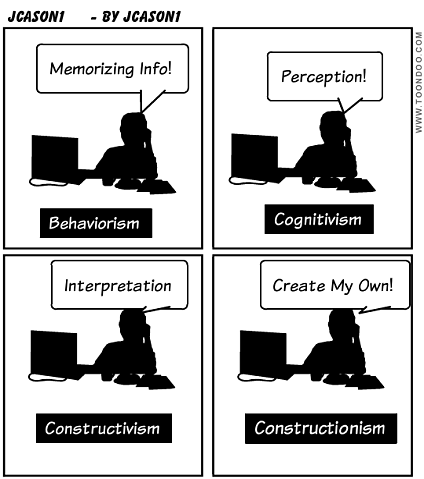
Chapter 3 also touched on 4 learning theories that I am a bit familiar with however, I learned how they infused these theories within technology. Older-style computer instructions were based on behaviorism, representing pages of graphics and text controlled by the computer. Cognitivsm  is learning through memory and perception, which is used on program design and how the learner shares control with the computer. In constructivism, the implication for teaching is focusing computer activities on learning and constructionism is when students create their own computer learning games and software. Now it makes sense why teachers encourage computer based learning programs. Depending on what type of learner you are, there is something for everyone.
Last but not least, I loved the idea of High Tech High.It gives the students the opportunity to learn with a more hands-on approach. Since that's the way I learn, I figured that schools, as such, would be perfect. The idea of teachers working in teams and students shadowing adults in the work field sounds like a great idea.
In conclusion, Chapter 3(Transforming Learning with Unique, Powerful Technology) shows that there are many ways technology assists in education. It shows different and creative ways that children can learn and teachers can teach.
RESOURCES: 
"High Tech High International (San Diego, California)." YouTube. YouTube, n.d. Web. 01 Feb. 2015.
Maloy, Robert, Verock-O’Loughlin,Ruth-Ellen, Edwards, Sharon A., and Woolf, Beverly Park (2013). Transforming Learning with New Technologies. 2nd Edition. Boston, MA: Pearson Education, Inc.
 Wanwright, Ashley. "10 Reasons Today's Students NEED Technology in the Classroom." SecurEdge Networks. N.p., n.d. Web. 29 Jan. 2015.